Know your loyalty numbers.
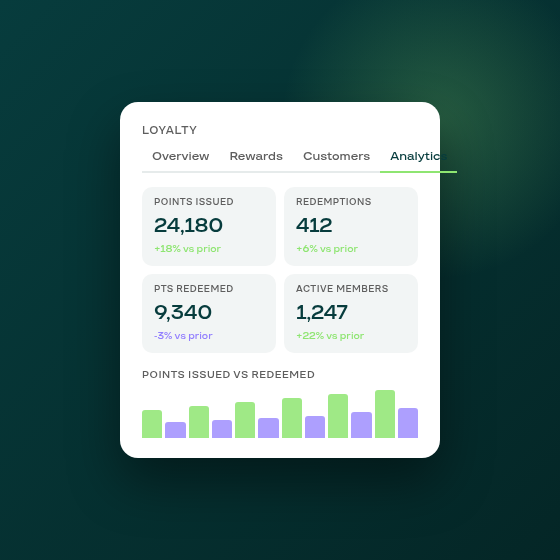
Running a loyalty program without usage data is running it blind. Until now, Subi's loyalty page showed configuration and member activity but no aggregated view of how the program was performing over time.
The new Analytics tab addresses that. Find it between the Customers and Settings tabs on your loyalty page.
Four KPIs, each with a period-over-period delta:
- Points issued: total points earned by customers in the period
- Points redeemed: points converted into discounts or rewards
- Redemptions: number of distinct redemption events
- Active members: customers who earned or redeemed at least once in the window
Each figure shows the same number for the prior period of equal length alongside the change, so you can see at a glance whether your program is accelerating or plateauing.
Below the KPIs, a bar chart plots points issued against points redeemed across the period, so you can see whether customers are earning and spending at a healthy ratio. A second section breaks down redemptions by reward type, so you can see which rewards are actually being used.
The tab is available to all merchants with the loyalty program active. No configuration is needed; the data is calculated from your existing program activity.